GED Test Dates 2026: How to Find an Appointment and Schedule
Looking for GED test dates? There is not one national exam day that every learner follows. You choose an available appointment through the official GED.com process after confirming your state, subject, testing option, readiness, and identification requirements.

Quick Answer: How Do GED Test Dates Work?
GED test dates are appointment slots, not one nationwide test day. Start in your official GED.com account, select the state or jurisdiction, choose the subject, compare an approved test center or online option when available, and then select a date and time that your account offers. Before you book, confirm your ID, eligibility, current cost, readiness requirements, and ability to attend the appointment.
Are There Fixed GED Test Dates?
The phrase GED test dates can sound like the GED is offered on a small set of national exam days. In practice, the official scheduling process is built around appointments. Your choices depend on the state or jurisdiction, the subject you want to take, the testing format, and the appointment availability shown in your account.
That is why a third-party page may explain how to schedule a GED test but cannot promise that a particular location has an open seat. A date that appears for one learner may not appear for another learner in a different state, or for a different subject and format. Use online search results to understand the process, then use the official account as the source for the actual date and time.
The date shown in your account is the date that matters
State policies, testing-center schedules, online eligibility, fees, and readiness rules can change. Do not copy a date list from an old blog post or assume that a generic “GED schedule” applies to every state. Check the official GED state policy page and your own appointment screen before paying.
How to Find a GED Test Date: Step by Step
Use this order to avoid choosing a date before you know whether you can actually use it. The exact buttons and availability are controlled by the official service, but the preparation sequence is useful for both test-center and approved online appointments.
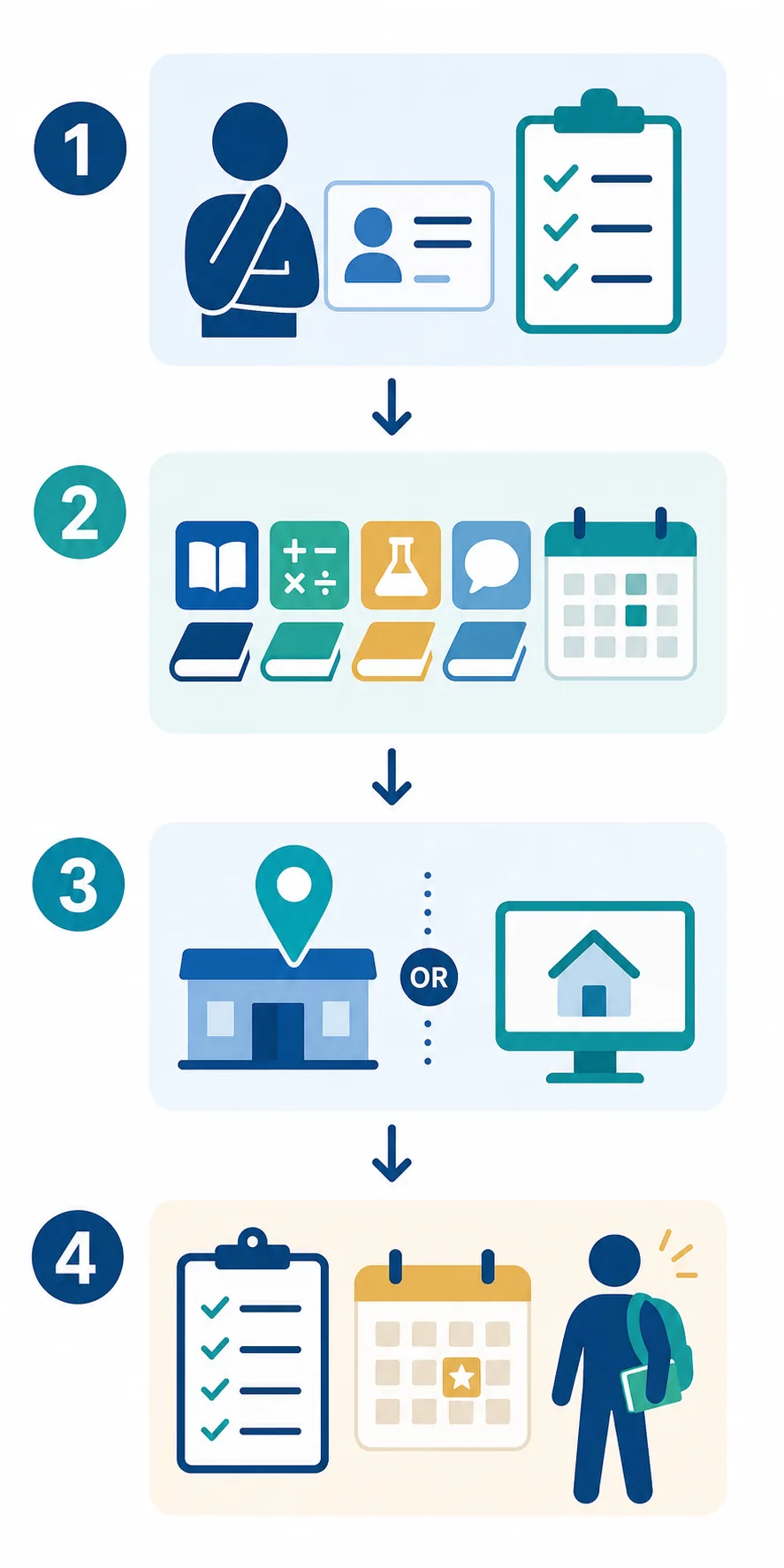
1Confirm your state and basic eligibility
Begin with the state or jurisdiction where you plan to test. Check age rules, school enrollment status, residency rules, identity documents, and any underage approval paperwork. If your legal name, account details, or ID do not match, fix that problem before you spend time comparing appointment slots. Our GED requirements guide is a useful preparation checklist, but the official state policy remains the final authority.
2Choose the subject you are ready to schedule
The GED is made up of separate subject tests. You do not have to treat all four subjects as one appointment decision. Review your practice results, identify the subject with the clearest readiness signal, and schedule that subject only when you can explain why the date is realistic. Use a free GED practice test to find gaps before paying for a date.
3Compare test center and online options
If your account offers both formats, compare the tradeoffs before you select a slot. A test center may reduce home technology and privacy problems. Approved online testing may reduce travel but can add equipment, room, system-check, and proctoring requirements. Read the online GED testing guide if you are considering the at-home option.
4Review the dates and times shown for your choice
Search the available appointment list after you have chosen the state, subject, and format. Look for a date that gives you enough time to prepare and arrive or check in without rushing. A convenient date is not automatically a good date if you have not reviewed missed questions, checked your ID, or completed the required readiness steps.
5Confirm the appointment details before payment
Read the subject, date, time zone, location or online format, fee, cancellation or rescheduling terms, check-in instructions, and required documents. Save the confirmation details somewhere you can find them. If the information is unclear, ask the official service before paying rather than relying on a forum answer.
What to Check Before Booking a Date
Use the table below as a last-minute decision filter. It separates a date that is technically available from a date that is actually workable for you.
| Check | Why It Matters | What to Do |
|---|---|---|
| Eligibility | Age, school status, residency, and state rules can affect whether you may book. | Review the current official state policy before selecting a slot. |
| Identification | A mismatch or unacceptable ID can stop check-in even when the appointment is paid. | Use a current accepted ID and make sure your account details match. |
| Readiness | Some online paths or state rules may require a current readiness result. | Read the GED Ready guide and verify the live rule in your account. |
| Cost | Subject fees, online differences, retakes, and preparation costs can change the real budget. | Use the GED test cost guide, then verify your state price. |
| Time and travel | A date that conflicts with work, transportation, childcare, or a long commute creates avoidable risk. | Choose a realistic slot and plan to arrive or check in early. |
| Test format | Online testing can add room, webcam, microphone, browser, and system-check requirements. | Use a test center when the home setup is unreliable, or complete the official system check first. |
GED Test Center vs. Approved Online Testing
Searching for a “GED testing center near me” is useful when you want to compare locations, but the official account is still where you confirm whether a location has a date for your subject. If an approved online option is available, it may show a separate appointment path rather than the same inventory as local centers.

| Option | May Fit You If... | Plan for... |
|---|---|---|
| Test center | You want an established testing room, in-person check-in, or fewer home technology variables. | Travel time, center availability, ID, arrival time, and local center instructions. |
| Approved online testing | Your state, subject, account, and home setup meet the current online requirements. | Private room, compatible computer, webcam, microphone, stable internet, system check, and remote check-in. |
When Should You Schedule the GED?
Schedule when the date supports your study plan, not simply because a slot appears. A short diagnostic can show which subject should come first. After that, use targeted practice, review missed questions, and take a timed set before committing to a paid appointment. The GED test timing guide can help you plan the day and decide whether splitting subjects is more realistic.
Near test day, use the date as a planning anchor. Work backward from it: finish the weakest skill review, complete a timed practice session, confirm the official requirements, prepare your route or room, and stop changing your study plan at the last minute. If your readiness result is uncertain, moving the date may be more useful than hoping one extra late-night study session fixes a large gap.
What If No GED Test Date Is Available?
No available date does not automatically mean the GED is unavailable. The result may depend on the subject, testing format, state, location, or the date range you searched. Check the following without assuming that a third-party list is current:
- Confirm that you selected the correct state or jurisdiction and the subject you actually want to take.
- Compare an approved test-center path with online testing only when your account says you are eligible.
- Try another official location or a later appointment range if the account offers those choices.
- Check whether a missing ID, readiness result, payment step, or state approval is blocking the schedule.
- Contact the official GED service when the account shows an error or your eligibility does not match the policy.
GED Test Dates FAQ
Bottom Line
GED test dates are best understood as appointment choices inside the official scheduling process. Start with eligibility, choose a subject, compare the approved testing options, review the date and time shown for your account, and then confirm cost, ID, readiness, travel, or home setup before paying.
This guide was checked on August 18, 2026. State policies, fees, online availability, and appointment instructions can change, so use the official GED account and state policy page as the final source before scheduling.
Official References
- GED.com: Take the GED Test — official test overview, scheduling, and test-format information.
- GED.com: Test Takers — official account and test-taker guidance.
- GED.com: State Policies — state or jurisdiction rules, fees, eligibility, and availability checks.
- GED.com: Take the GED Test Online — current online eligibility, equipment, room, and appointment requirements.
Before You Book
- Confirm state eligibility and ID.
- Choose the strongest ready subject.
- Compare test center and online rules.
- Check current cost and readiness steps.
- Save the confirmation details.
Build Your Preparation Plan
Use a short diagnostic before you commit to a date. Practice, review missed skills, then retest the subject that needs the most work.
Take a 20-Question Diagnostic